VSDC Free Video Editor

VSDC Free Video Editor 10.1

Non-linear video editor with Instagram-like filters

10.1.10 Latest version
Freeware Absolutely free
Mac No version
Developer Flash-Integro LLC

Program info

See all (57)
Main Window
Main window
Main window
Main window
Main Interface
Video Editor
Slideshow Creator
Video Converter
Screen Recorder Settings
Webcam Video Capture
Video Converter

If in search for a comprehensive video tool for free you may consider trying VSDC Free Video Editor. Though advertised as a video editor, this full-featured video utility allows you create new videos (via your webcam), mix video files and add other media to the mix, create slideshows, capture your screen activity, convert video files, and a wealth of other functions and editing features.

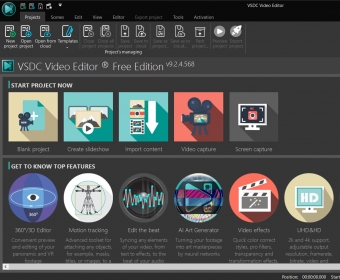
For a free software tool, VSDC Free Video Editor offers many more tools, utilities, options, and functions than most open source and free video editors available on the Web. This extensive functionality translates into a set of interfaces that are far from being the most intuitive ones. Thus, to make the most of this free tool, be prepared to climb a steep learning curve. Only the main interface offers a set of large and intuitive icons to help you choose the right “project” or task. Here you can choose amongst creating a new video (Blank project), create a slideshow, import content (for editing, mixing, and enhancing), capture video, and record your desktop activity. From here onwards, you’ll be presented with a set of dedicated interfaces that make many professional and expensive tools pale in comparison in terms of functionality and complexity.

Not all projects demand a high level of expertise, though. Capturing video, producing slideshows from your best photos, and recording your desktop are fairly simple activities, and are likely to get excellent results without having to become a video expert first. They resemble very much the average look and feel of other similar tools. Editing video, mixing audio and video tracks, adding effects and filters, and even converting video between formats are much less intuitive. They’re closer to the wealth of features that you usually find in professional video editing tools.

Thus, enumerating all the functions and features made available for the various projects would be both cumbersome and useless. Suffice it to say that VSDC Free Video Editor is an all-in-one tool that covers all the stages of video production and edition. With this free utility, you can produce high-quality videos in any of the most widely used file formats and burn them to disc or upload them to your favorite social network straight away. To this end, the program offers you a set of export profiles that match the most common requirements needed to upload media to YouTube, Instagram, Twitter, and Vimeo.

FM
Francisco Martínez
4 (Senior editor)

Pros

  • Provides a timeline-based video editor
  • Offers a slideshow creator with effects and transitions
  • Record all your desktop activity
  • Includes export profiles specific to well-known social networks
  • Make recordings using your webcam

Cons

  • Offers a low level of intuitiveness
  • Requires a steep learning curve

Details

Extensions

No extensions

No information available

The data will be available later.

Awards

User
A
Abhishek Nandan
Very good video editing software. More
N
Natchatran Swaran
I am using this as it is free. Correct latest versions as they are very heavy for old laptops!! More
See all comments (82)

Suggestions

  • All video editor.exe
  • Android phone video editor apk
  • All in one video editor apk
  • Vsdc free video editor
  • Video editor apk free download
  • Video editing free download
  • Video editing apk free download
  • Video editor download android
  • Download vsdc free video editor